NOTE: Please find difference between 'w' & 'W' below
Week
**Current Week #** in **Current Year** `system.now().format('w')`
**Current Week #** in **current Month** `system.now().format('W')`
NOTE: Please find difference between 'w' & 'W' above
Month
To get **Current Month** as Integer `system.now().format('M')`
To get **Current Month** as semi string i.e, **Jan, Feb, Mar** and so on `system.now().format('MMM')` `system.now().format('MMM')`
To get **Current Month** as full string i.e., **January, February** and so on `system.now().format('MMMM')`
Year
Current Year as **XXXX** => `system.now().format('Y')`
Current Year as **XX** => `system.now().format('YY')`
NOTE: Format methods returns as String, from string convert into respective dataType
Time
**AM/PM** => `system.now().format('a')`
**Hour** in Day **(00-23)** => `system.now().format('a')`
**Hour** in Day **(01-24)** => `system.now().format('k')`
**Hour** in AM/PM **(00-11)** => `system.now().format('a')`
**Hour** in AM/PM **(01-12)** => `system.now().format('a')`
**Minute** in **Hour** => `system.now().format('m')`
**Second** in **Minute** => `system.now().format('s')`
**MilliSecond** in **Minute** => `system.now().format('S')`
**Time Zone** => `system.now().format('z')`
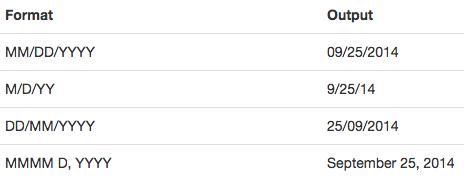
Display Date in Different Types as follows,
Magic with Apex Dates with DAYS
| Use Case |
Syntax |
Output |
| Day in Week |
system.now().format('F') |
Integer |
| Day in Month |
system.now().format('d') |
Integer |
| Day in Year |
system.now().format('D') |
Integer |
| Day as Week |
system.now().format('E') |
SUN, MON, TUE |
| Day as Week |
system.now().format('EEEE') |
SUNDAY, MONDAY, TUESDAY |
Note For all above methods GMT timezone is default. In order to get results as per your Timezone pass TIMEZONE as extra parameter.
For e.g., IST, PST, EDT etc.. so methods looks like system.now().format('d', 'IST')
