
PageBlock/PageBlockTable with Scrollbars using Visualforce page

To show <apex:pageBlockTable> in scroll bars, simply put pageBlockTable under <div> tags as shown
<div style="overflow: scroll; width: 400px; height: 200px;">
    <apex:pageBlock title="My Content">
        <apex:pageBlockTable value="{!accounts}" var="item">
            <apex:column value="{!item.name}" />
            <apex:column value="{!item.Rating}" />
            <!-- Header Generated automatically -->
        </apex:pageBlockTable>
    </apex:pageBlock>
</div>
Output
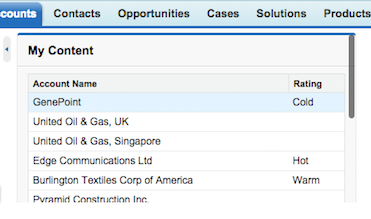
NOTE: Here width set to 400px i.e., width:400px;, this is optional if not specified it will take 100% but to get Scrollbar height:200px; is mandatory, along with overflow: auto; which is key to see scrollbars.